Sometimes parents can assume that the only way to stay in touch with their child – for sports, babysitting, etc. – is with a smartphone.
The goal of your smartphone-alternative showcase event is to raise awareness that parents have many non-smartphone options!
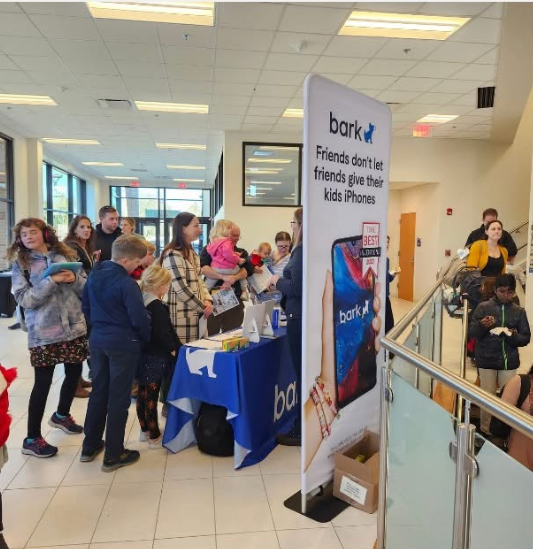
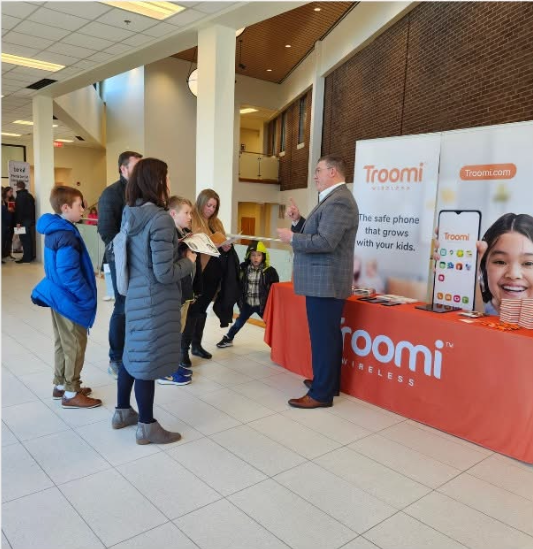
What is this event all about? You invite representatives from companies like Gabb, Troomi, Bark, Pinwheel, Light Phone, and Tin Can to come to your parish and show their devices to families. Your job is to draw a large crowd and create a comfortable space for everybody; their job is to show families the possibilities. We are helping families think beyond the iPhone.
What are these devices?
Short answer: they are devices that do some, but not all of the things that smartphones do. Some essentially just talk and text. Others have more features, like cameras and directions. Still others can be customized with robust parental controls and tools to give parents insights into their children’s technology use while blocking problematic content and sites like social media and pornography. It is even possible to buy a device that allows internet search, but that uses AI to vet each webpage in real time and block it unless it suits your stated parenting preferences.
Long answer: read this and this.
How one chapter planned a smartphone-alternative showcase
- First, we asked permission from our pastor. We were clear in what we were asking for: permission, physical space, the ability to advertise through church channels, and (ideally) about $200 for signage (more on that later) plus some extra cash to buy a meal for our vendors (since our event took place over several hours).
- Our pastor also encouraged people to go in his homilies and in his pastor’s column in the bulletin.
- Once you have permission, you can choose a date and time.
- November can be ideal, as many people buy devices as Christmas gifts.
- Consider taking advantage of existing crowds. We had success setting up outside of the church (right by the donuts!) after every Mass so that people would walk right through the displays as they left. (Another chapter set up during the parish book fair.)
- Reserve your space with the parish office, making sure that you account for time to set up and tear down.
- Get commitments from vendors. Ask them if they would be willing to come and also to donate any devices to raffle off. At our event, we raffled off $3,000 in devices, which was a great way to draw people in.
- Consider asking Bark, Gabb, Troomi, Pinwheel, Light Phone, Tin Can, Ooma, etc. Contact us if you need an introduction.
- Get commitments from volunteers for the day of the event. How many people will you need to make the event come off successfully? What hours are you asking them to be there? Consider volunteers for these jobs:
- greeting the vendors before the event and being present/supporting them as they set up
- handing out flyers as people come out of Mass
- running the raffle table (more on that later)
- running the Anxious Generation and Wait Until 8th table(s) (more on that later)
- bringing food for vendors and volunteers (if the event will be happening over meal times)
- helping with tear-down
- Develop signs and advertisements that look cohesive. We called our event “Navigate: Exploring Simple Alternatives to Smartphones” and made our own “Navigate” logo (which you may use). We used the logo to create a large banner for the event, a digital ad, paper signs that we put in the parish’s sign holders to direct people through the area, and a flyer that we handed out to people as they left Mass so that they would know the event was going on.
- Procure tables and tablecloths. You may also want to get some chairs so that vendors can rest as needed. Your parish probably already has what you need on site, but you’ll have to reserve it in advance.
- Raffle table. Ask your raffle table volunteer to print out a bunch of raffle tickets. The tickets should have a spot for the raffle entrant’s name, email address, and phone number. It should also have a list of devices that you are raffling off so that the raffle entrant can put a check mark next to the devices they might be interested in winning.
- Your volunteer should bring the tickets, along with several pens (they get lost) and a ticket receptacle of some kind to the event.
- On the day of the event, your volunteer should display the devices to be raffled off in a pleasing way on the raffle table.
- Make sure the raffle table volunteer understands the different devices, as people will ask them questions. At the very least, give them plenty of copies of the parent guides (shorter and longer versions) that they can hand out and refer questioners to.
- Ideally, the raffle table volunteer would also compile the email addresses of raffle entrants into a spreadsheet after the event to add to the mailing list for your local SCPN newsletter!
- Anxious Generation table and Wait Until 8th table. These can be separate tables or the same table with a single volunteer.
- Anxious Generation table
- This is where you can sell copies of the Anxious Generation.
- Buy a bunch of copies (15-20?) in advance.
- Option 1: Your parish buys them for you to sell at cost (and then you return the money to the parish).
- Option 2: You buy them to sell at cost.
- The downside of option 2 is that you may be personally on the hook for extra copies that don’t sell (if you can’t just return unsold copies). The benefit is that you can use Venmo. We did Option 1 and were restricted by parish policy from using Venmo to accept payment.
- Make sure your table volunteer has read the book and can speak about it.
- The Anxious Generation website has imagery that you can use to print out a nice tabletop sign for this table.
- Wait Until 8th table
- This is where you explain the pledge and have a way for people to sign it on the spot, such as on an iPad or on paper.
- Please note – and make sure your volunteer knows this as well – that many but not all devices that are marketed to kids are Wait Until 8th approved. See the shorter parent guide for details on which phones are and are not approved. (The rule has to do with what is available on the device by default.)
- For signage, you can use imagery that is available on the Wait Until 8th website here (scroll down to where it says “posters”). Keep your sign for later uses!
- Anxious Generation table
- Print out a whole lot of copies of the two parent guides (shorter and longer versions) and put them at the entrance to the event, the exit, on the raffle table, and on the Anxious Generation/Wait Until 8th table(s). Encourage every parent to take copies.
- If you have copies left over after the event, ask if you can put them out in the parish office and/or school office.
- Start advertising four weeks out. Here is some sample language you can use. Think school newsletter, parish bulletin, parish and school social media channels, personal social media channels of your volunteers, local Facebook groups, school-wide email if possible, local newspapers, local library bulletin boards, newsletters and bulletins of nearby schools and churches (not just Catholic ones), etc.
- Set up the event ahead of time with the vendors
- Hold the event!
- Send thank-you notes to volunteers and vendors after the event
- Draw names to get raffle winners. Contact them to let them know that they’ve won and that they can pick up their device. We left the devices with the parish office staff in a locked cabinet so that people could pick up their device at any time during parish office hours.
- Add raffle contact info to your newsletter mailing list.
- Reflect on what went well and what you would change next time. Please tell us what you learned!

 St. Carlo Parent Network
Leave a comment