Organize a high school alumni panel presentation at your school.
Invite 4-6 current high school students (recommend juniors and seniors) who are alumni to come back to your school to participate in a 1-hour panel discussion during the school day about smartphones, social media, and technology.
All middle school students and their teachers should attend.
Find a parent volunteer to lead the panel discussion. Choose a theme like “A High School Perspective on Growing up with Technology” or “Managing High School Pressures and Maintaining Mental Health.”
Meet with high schoolers ahead of time to share the list of questions so panelists can prepare and rehearse their responses. This helps foster authentic sharing about personal stories and specific anecdotes while also protecting the identities of parties involved.
Consider recording the panel discussion and sharing the video with middle school parents afterwards.
In choosing the alumni, guidance counselors, teachers, and administrators at the high school can be good resources.
If high school students will already be visiting your school during Catholic Schools Week, this could be a convenient time to hold the panel.
The idea behind the play club is simple: give kids a chance to play together, screen-free.
This is SCPN’s answer to Jonathan Haidt’s recommendation that we give kids much more time to play with each other, face to face, with minimal adult involvement (“lifeguard model”).
You can start something formal like a Let Grow Play Club at your school – see their website for very helpful resources.
Or, you can simply publicize a date and location every so often. No need for additional planning beyond that!
Our chapters have had success indicating that these are not drop-off events. Parents stay on site, but they socialize among themselves while their kids play independently, screen-free.
Of course, it would be possible to do this in different ways.
However you do it, the goal is to create opportunities for kids to enjoy being social, face to face, in real life.
Sometimes parents can assume that the only way to stay in touch with their child – for sports, babysitting, etc. – is with a smartphone.
The goal of your smartphone-alternative showcase event is to raise awareness that parents have many non-smartphone options!
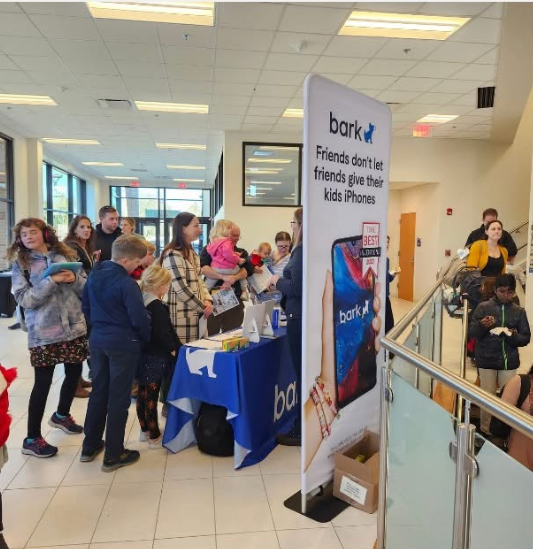
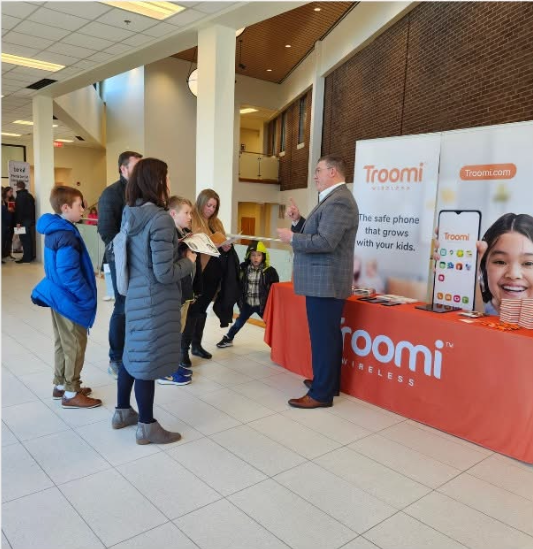
What is this event all about? You invite representatives from companies like Gabb, Troomi, Bark, Pinwheel, Light Phone, and Tin Can to come to your parish and show their devices to families. Your job is to draw a large crowd and create a comfortable space for everybody; their job is to show families the possibilities. We are helping families think beyond the iPhone.
What are these devices?
Short answer: they are devices that do some, but not all of the things that smartphones do. Some essentially just talk and text. Others have more features, like cameras and directions. Still others can be customized with robust parental controls and tools to give parents insights into their children’s technology use while blocking problematic content and sites like social media and pornography. It is even possible to buy a device that allows internet search, but that uses AI to vet each webpage in real time and block it unless it suits your stated parenting preferences.
How one chapter planned a smartphone-alternative showcase
First, we asked permission from our pastor. We were clear in what we were asking for: permission, physical space, the ability to advertise through church channels, and (ideally) about $200 for signage (more on that later) plus some extra cash to buy a meal for our vendors (since our event took place over several hours).
Our pastor also encouraged people to go in his homilies and in his pastor’s column in the bulletin.
Once you have permission, you can choose a date and time.
November can be ideal, as many people buy devices as Christmas gifts.
Consider taking advantage of existing crowds. We had success setting up outside of the church (right by the donuts!) after every Mass so that people would walk right through the displays as they left. (Another chapter set up during the parish book fair.)
Reserve your space with the parish office, making sure that you account for time to set up and tear down.
Get commitments from vendors. Ask them if they would be willing to come and also to donate any devices to raffle off. At our event, we raffled off $3,000 in devices, which was a great way to draw people in.
Consider asking Bark, Gabb, Troomi, Pinwheel, Light Phone, Tin Can, Ooma, etc. Contact us if you need an introduction.
Get commitments from volunteers for the day of the event. How many people will you need to make the event come off successfully? What hours are you asking them to be there? Consider volunteers for these jobs:
greeting the vendors before the event and being present/supporting them as they set up
handing out flyers as people come out of Mass
running the raffle table (more on that later)
running the Anxious Generation and Wait Until 8th table(s) (more on that later)
bringing food for vendors and volunteers (if the event will be happening over meal times)
helping with tear-down
Develop signs and advertisements that look cohesive. We called our event “Navigate: Exploring Simple Alternatives to Smartphones” and made our own “Navigate” logo (which you may use). We used the logo to create a large banner for the event, a digital ad, paper signs that we put in the parish’s sign holders to direct people through the area, and a flyer that we handed out to people as they left Mass so that they would know the event was going on.
Procure tables and tablecloths. You may also want to get some chairs so that vendors can rest as needed. Your parish probably already has what you need on site, but you’ll have to reserve it in advance.
Raffle table. Ask your raffle table volunteer to print out a bunch of raffle tickets. The tickets should have a spot for the raffle entrant’s name, email address, and phone number. It should also have a list of devices that you are raffling off so that the raffle entrant can put a check mark next to the devices they might be interested in winning.
Your volunteer should bring the tickets, along with several pens (they get lost) and a ticket receptacle of some kind to the event.
On the day of the event, your volunteer should display the devices to be raffled off in a pleasing way on the raffle table.
Make sure the raffle table volunteer understands the different devices, as people will ask them questions. At the very least, give them plenty of copies of the parent guides (shorter and longer versions) that they can hand out and refer questioners to.
Ideally, the raffle table volunteer would also compile the email addresses of raffle entrants into a spreadsheet after the event to add to the mailing list for your local SCPN newsletter!
Anxious Generation table and Wait Until 8th table. These can be separate tables or the same table with a single volunteer.
Anxious Generation table
This is where you can sell copies of the Anxious Generation.
Buy a bunch of copies (15-20?) in advance.
Option 1: Your parish buys them for you to sell at cost (and then you return the money to the parish).
Option 2: You buy them to sell at cost.
The downside of option 2 is that you may be personally on the hook for extra copies that don’t sell (if you can’t just return unsold copies). The benefit is that you can use Venmo. We did Option 1 and were restricted by parish policy from using Venmo to accept payment.
Make sure your table volunteer has read the book and can speak about it.
The Anxious Generation website has imagery that you can use to print out a nice tabletop sign for this table.
Wait Until 8thtable
This is where you explain the pledge and have a way for people to sign it on the spot, such as on an iPad or on paper.
Please note – and make sure your volunteer knows this as well – that many but not all devices that are marketed to kids are Wait Until 8th approved. See the shorter parent guide for details on which phones are and are not approved. (The rule has to do with what is available on the device by default.)
For signage, you can use imagery that is available on the Wait Until 8th website here (scroll down to where it says “posters”). Keep your sign for later uses!
Print out a whole lot of copies of the two parent guides (shorter and longer versions) and put them at the entrance to the event, the exit, on the raffle table, and on the Anxious Generation/Wait Until 8th table(s). Encourage every parent to take copies.
If you have copies left over after the event, ask if you can put them out in the parish office and/or school office.
Start advertising four weeks out. Here is some sample language you can use. Think school newsletter, parish bulletin, parish and school social media channels, personal social media channels of your volunteers, local Facebook groups, school-wide email if possible, local newspapers, local library bulletin boards, newsletters and bulletins of nearby schools and churches (not just Catholic ones), etc.
Set up the event ahead of time with the vendors
Hold the event!
Send thank-you notes to volunteers and vendors after the event
Draw names to get raffle winners. Contact them to let them know that they’ve won and that they can pick up their device. We left the devices with the parish office staff in a locked cabinet so that people could pick up their device at any time during parish office hours.
Add raffle contact info to your newsletter mailing list.
Reflect on what went well and what you would change next time. Pleasetell uswhat you learned!
A parent pledge is a shared agreement among families to delay giving their children smartphones and/or social media until a certain age.
It helps reduce peer pressure by creating a community of parents making the same intentional choice.
The goal is not necessarily for every single parent to sign the pledge, but to build a network of support around parents who do choose to delay – because it’s not easy to do alone!
A number of SCPN chapters have had great success with the Wait Until 8th pledge. Two of our chapters are in the Top 10 list of schools with the most pledges nationwide!
Parents who sign the Wait Until 8th pledge agree not to give their child a personal smartphone (phones that just talk and text are okay) until at least the END of 8th grade. (The pledge does not say anything about social media.)
Their website has everything you need to get started. Start there.
How to go above and beyond
If you are looking to turbo-charge pledge momentum at your school – here are some over-achiever things that our SCPN chapters have tried with great success.
Recruit grade-level representatives.
If you can, find one parent per grade who is willing to be an extra point of contact for people with questions about the pledge.
Any time you communicate about Wait Until 8th, include the names and contact information (with permission) of all the grade-level representatives. This helps show that there is a broad base of community support.
Each grade-level representative should also write an email in the beginning of the year to the parents in their grade introducing themselves, explaining their personal interest in the pledge, and inviting other parents to sign.
Communicate about the pledge in many different ways (if you have permission): via grade-level parent emails, the school newsletter that goes out to parents, Back-to-School Night, setting up a booth at school/parish events, etc.
In-person, face-to-face conversations about the pledge are especially powerful!
Communicate over, and over, and over again.Once per month in the parent newsletter during the first year and a half is not too much. After that, less often is okay (with more of a push at the beginning of each school year).
Use parent testimonials.
Find parents in your school who are supportive – especially parents who are well known and well liked.
Ask these parents to write 1-3 sentences about why they signed the pledge, and with their permission, add these testimonials, along with a family photo, to your monthly ad for pledges in the parent newsletter.
Celebrate milestones. Did a grade get its first 10 pledges? Are pledges officially active in all the younger grades? Let everyone know in the parent newsletter. Celebrate the wins!
You can use our Excel template to generate a bar chart to show pledge progress in each grade. Publish an updated bar chart along with a new parent testimonial each month.
How do you find the number of pledges in each grade? Simply email info@waituntil8th.org and ask for a numbers update. (Alternatively, ask your grade-level representatives to forward you the list of names.)
Year 2: Incoming Kindergarten families.
Sometime in August, find a copy of the incoming Kindergarten roster and cross-check it to find any families who have already signed the Wait Until 8th pledge for older siblings.
Email these families. Say that you see they have already signed the pledge for the incoming Kindergartener’s older sibling(s), and ask if they would like to sign the pledge for the incoming Kindergartener as well. You can send a link to the pledge, but also offer that they can simply reply “yes” to your email, and you will sign up for them. (Yes, you can sign other people up on the WU8 website as long as you have their permission and basic info, which should be available in the parent directory.)
Then email all incoming Kindergarten families to explain the pledge and invite them to sign. Show them the bar chart from last year to show how much support the pledge has already at the school. Note that there are already ___ pledges from Kindergarten families, and the school year hasn’t even started yet! “We are so excited to see this momentum…”
Siblings. Sometimes parents don’t realize that they need to sign a pledge for each child. They mean for every child to be covered by the pledge, but they only actually sign one pledge.
After the pledge is well established, ask your grade-level representatives to forward you the names of all the pledgers.
Find some volunteers to help you pick out parents who signed up some but not all of their kids.
Email these parents to let them know the situation and gently invite them to sign the pledge for all of their kids – or if they prefer, simply reply “yes” to the email, and you will fill out the pledge form for them for their remaining kids not covered by the pledge.
Make sure people know that their kids can still have basic phones. There are a lot of great phone options for kids! Please widely share our parent guides: short version and long version.
When you appear at in-person events, you can have people sign the pledge on paper. Then, later, you can do the data entry for them. It keeps things simple. Use our template.
It is not necessary to do all of the things listed, but that is the playbook followed by the SCPN chapter at Our Lady of Mount Carmel, which is currently the #1 school in the United States for Wait Until 8th pledges!
The SCPN chapter at Our Lady of Mount Carmel leads the nation in Wait Until 8th pledges
Pros and Cons of Wait Until 8th
Pros
Name recognition – many people have already heard about the pledge.
The website has lots of helpful information, including parent discussion guides.
It follows kids if they change schools – for middle school, for example – so when your child enters a new school, there may already be a number of other students covered by the pledge who came from a different feeder school.
The pledge is not too strict to attract wide support.
Pledge signers receive a WU8 newsletter that helps raise awareness about smartphone and social media issues.
Cons
The pledge is not customizable.
It does not include social media.
You do not have easy access to the names of the people who pledged, so it can be difficult to 1) cross-check and make sure parents signed up all their children and not just one by mistake ; 2) cross-check names with the incoming Kindergarten roster; 3) vet the numbers for accuracy over time, as pledging families sometimes leave the school.
Parents can get confused about whether or not their kids can have smartphones in 8th grade (Wait Until AFTER 8th).
Other pledge options
To gain easier access to the data, you might consider simply creating your own pledge (same idea: no smartphones until after 8th grade) and offering it via a Google Form.
If you would like a more customized pledge, consider using this Pact Builder tool.
St. Carlo is a wonderful saint for modern kids to get to know.
SCPN chapters have worked with their principals in various ways to share his story and spirit in the classroom.
Here are some ideas.
Parents visit classrooms. With the principal’s permission, find parent volunteers who would be willing to visit each classroom for five minutes to tell the students about St. Carlo Acutis.
Carlo Acutis: Roadmap to Realityis an excellent film about St. Carlo and what we can learn from him about being holy and whole in the digital world. It is available to stream on Credo.
Via the principal, provide resources for teachers to teach about St. Carlo Acutis, if they desire to do so.
Some chapters, with principal’s approval, have invited a high school student to dress like St. Carlo and come into the classrooms to teach the kids about him on his feast day, October 12th. These “St. Carlos” have also been able to give away small items like St. Carlo water bottle stickers or St. Carlo medals.
Start a newsletter at your school to help bring visibility to the things that are workingalreadyin your own community.
The point of the newsletter is not primarily to keep parents up to date on news and trends related to digital wellness and media harms, although that can be a secondary piece.
We’re not trying to be Common Sense Media or After Babel. (Which is great, though, by the way.)
The newsletter is hyper-local. It features stories from people like the Computers teacher at the school, your friends, the mom you see at carpool, your pastor, etc. People you know.
Example newsletter topics:
Interview your Computers teacher about how he/she teaches media balance and digital safety
Interview your pastor and ask what types of conversations parents should be having with their kids now, given increasingly high rates of accidental exposure to online pornography in childhood
Interview your friend about how and why she uses a phone basket when friends come over to her house (bonus: do a phone basket giveaway!)
Interview a parent who was more permissive with older kids around device/media use but changed his/her approach to adopt stricter rules for younger kids as they reach the same age. What motivated the change in approach? How did they talk to their kids about it?
Along with these interviews, you can also link to some relevant, newsworthy articles or videos, yes. Also be sure to publicize any SCPN-related speakers or events people should know about.
But the purpose of the newsletter is to showcase what is working in your community right now, and what people in your community have learned from experience.
Why should the newsletter have this local focus?
It has to do with changing our perception of what is normal in our community. Kids often tell us, “I’m the only one in my grade without a phone,” when in reality, they may have just noticed a few classmates with phones and assumed that’s the norm. Phones are visible—what’s not visible are the kids without them. The same goes for social media: kids notice who is online, but they can’t see who isn’t.This leads to a skewed sense of what’s typical.
A hyper-local newsletter helps correct those false perceptions by spotlighting real families in your school community who are making thoughtful, pro-social choices—like using phone baskets at playdates or delaying social media.
By making these quiet choices visible, you help shift the culture. People begin to see that they’re not alone.
Although St. Carlo Acutis loved video games, he limited himself to one hour per week in order to preserve time for more important things, like prayer and time with friends and family.
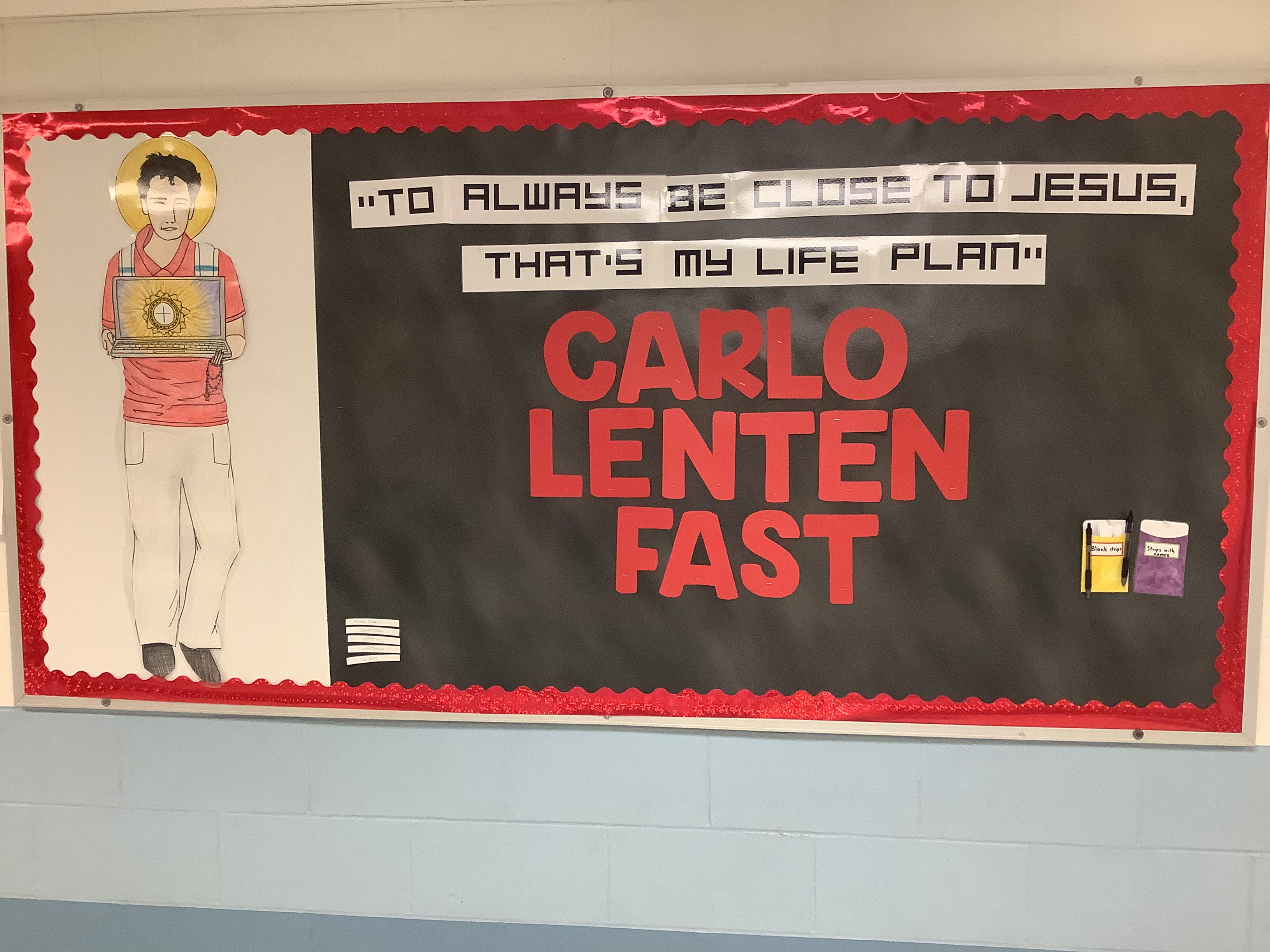
The “Carlo Fast” is based on this choice he made. Participating in a Carlo Fast during Advent or Lent means limiting yourself to one hour per week of recreational screen time during the liturgical season.
Screen time that is necessary for school or work is okay. Family movie night is also an exception.
We recommend issuing this challenge to people of all ages in your school and parish!
Advent challenge
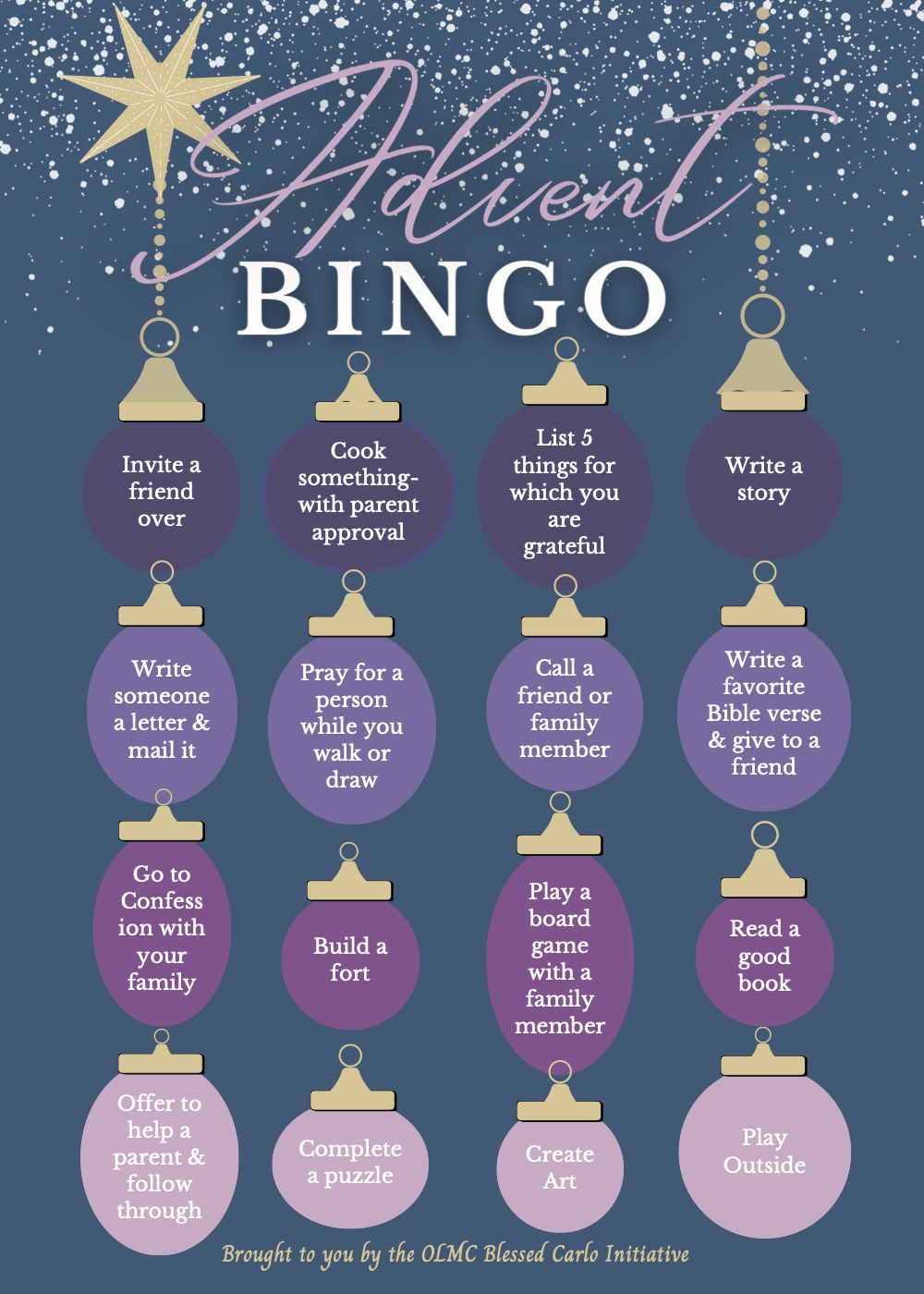
It can be a great idea to offer participants ideas for what to do with their screen-free time. One way that some of our chapters do this is by using “Advent Bingo” cards.
First, people commit to the Carlo Fast. Then, they receive an Advent Bingo card (kid version, adult version) with ideas for fun activities to do while they are screen-limited. When they make a “Bingo” row on the card, they can pick up a slip of pink or purple (Advent colors) paper to add to a paper chain that will decorate the Carlo Trees.
These are the Carlo Trees that Our Lady of Mount Carmel Parish uses during Advent. On the table are extra Advent Bingo Cards, extra stickers to cover completed Bingo items, pink and purple (Advent colors) slips of paper for the paper chains, and tape. An Advent wreath also decorates the table. (One tree will be enough for most parishes.)
Here is some sample language to invite your parish to participate in the Advent challenge. This text can also be printed on the backs of the Advent Bingo cards.
We recommend handing out the Advent Bingo cards in school as well as through the parish faith formation classes.
Lent challenge
The Lent challenge can look similar to the Advent challenge, or mix it up! Instead of doing the Bingo cards, some of our chapters partner together. They make and share two videos: one just before Lent starts and one after Easter.
The first video, fast-paced and fun, features students of all ages (and representing each participating school/parish community) who will be participating in the Carlo Fast. The kids explain how the Carlo Fast works and enthusiastically invite other kids to join. They can also say briefly why they personally are doing the fast. Get a few adults – priests, teachers, administrators, parents – to participate as well. Explain that multiple communities will be uniting to do this together. Share this video widely within the participating communities.
Make a form or some kind of sign-up sheet – only as a way of helping people commit. Kids should have a way to sign up during school, either during class, during lunch/recess, and/or some other way (example: take over a bulletin board).
After Easter, make and share another fun video, again featuring students and a few adults from all participating communities. Let them share how it went, what they learned, what they found extra time for when they were screen-limited, what may have surprised them, and whether they would do it again!
This document contains everything you need to start a discussion group and sustain it throughout a whole year, including discussion topics, questions, and resources.
Book club
A book club is a bit more involved, as people have to find the time outside of the meetings to read. For this reason, they tend to reach fewer people – but they also have the potential to have a greater impact, since people are delving more deeply into material.
Aim for no more than 1-2 books per year. Many publishers offer discussion questions to go along with the books, so you may not need to reinvent the wheel.
Our recommendations:
“THE INSTANT #1 NEW YORK TIMES BESTSELLER • A Wall Street Journal Top 10 Book of 2024 • A New York Times and Washington Post Notable Book
“A must-read for all parents: the generation-defining investigation into the collapse of youth mental health in the era of smartphones, social media, and big tech—and a plan
“Minimalism is the art of knowing how much is just enough. Digital minimalism applies this idea to our personal technology. It’s the key to living a focused life in an increasingly noisy world.
“In this timely and enlightening book, the bestselling author of Deep Work introduces a philosophy for technology use that has already improved countless lives.”
“New York columnist-turned-movement leader Lenore Skenazy delivers a compelling and entertaining look at how we got so worried about everything our kids do, see, eat, read, wear, watch and lick — and how to bid a whole lot of that anxiety goodbye. With real-world examples, advice, and a gimlet-eyed look at the way our culture forces fear down our throats, Skenazy describes how parents and educators can step back so kids step up. Positive change is faster, easier and a lot more fun than you’d believe. This is the book that has helped millions of American parents feel brave and optimistic again – and the same goes for their kids.”
In Better Than Real Life, child and adolescent psychologist Richard Freed reveals how Silicon Valley’s secret science of persuasive design is pulling a generation of kids away from the real world to live on social media, video games, and online video. The psychological science is so powerful that it is able to persuade youth, at a genetic level, that sitting sedentary on playtime screens is better than running and playing, better than engaging with school, better than spending time with family. He shows how social media exploit girls’ DNA-driven instincts with tragic consequences for their mental health, while video games take advantage of boys’ Stone Age impulses, increasing the risks of academic struggles and gaming addiction.






 St. Carlo Parent Network